Search found 1057 matches
- Wed Apr 01, 2026 9:30 am
- Forum: RiskyProject: Project risk management and risk analysis software
- Topic: Visibility of Assigned Calendar Column
- Replies: 1
- Views: 476
Re: Visibility of Assigned Calendar Column
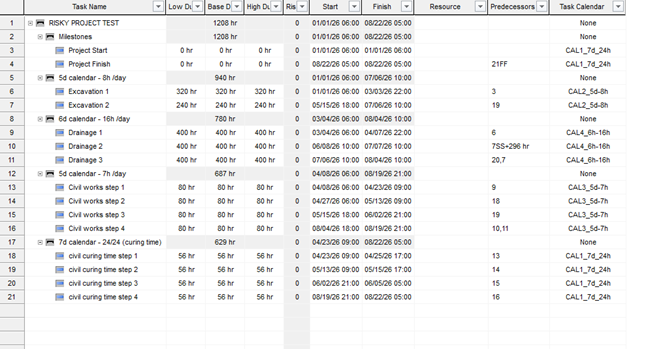
To see the calendars assigned to individual tasks, you need to add the Task Calendar column to your view.
- Wed Apr 01, 2026 9:26 am
- Forum: RiskyProject: Project risk management and risk analysis software
- Topic: Missing Access to Main Project Settings
- Replies: 1
- Views: 208
Re: Missing Access to Main Project Settings
In the latest version 8.0 of the software, these settings have been moved. You can now find the primary project and calendar configurations under File > Options > Calendar.
- Wed Apr 01, 2026 9:23 am
- Forum: RiskyProject Project Risk Analysis Software Issues
- Topic: Activities Using Incorrect or "Unknown" Calendars
- Replies: 1
- Views: 480
Re: Activities Using Incorrect or "Unknown" Calendars
Analysis of the imported data shows that calendars are generally picked up correctly. However, if the Default Start Time in the global options differs from the source file, it can simulate the appearance of an incorrect calendar. Additionally, users should verify the settings in File > Options > Cal...
- Wed Apr 01, 2026 9:18 am
- Forum: RiskyProject Project Risk Analysis Software Issues
- Topic: Discrepancy in Schedule Dates and Durations in XER
- Replies: 1
- Views: 242
Re: Discrepancy in Schedule Dates and Durations in XER
This is typically caused by a difference in Project Start Time settings rather than a failure to import calendars. Even a small difference (e.g., 6:00 AM vs. 8:00 AM) creates a shift across the entire schedule. To fix this, ensure the Project Start time in RiskyProject matches the exact start time d...
- Wed Mar 04, 2026 7:44 pm
- Forum: Project Risk Analysis and Project Risk Management Theory
- Topic: New calculation feature of RiskyProject 8
- Replies: 0
- Views: 13580
New calculation feature of RiskyProject 8
New RiskyProject version 8 allows forecasting of project and task performance using Bayesian analysis. This method uses the same input data as the traditional analysis described in Calculating and Reassessing Tasks Using Tracking Data: the percentage of task completion and the associated status date...
- Wed Mar 04, 2026 7:38 pm
- Forum: RiskyProject Project Risk Analysis Software Issues
- Topic: RiskyProject 8 is released.
- Replies: 0
- Views: 13414
RiskyProject 8 is released.
Intaver Institute has released RiskyProject version 8.0. RiskyProject 8.0 is a major software release that includes multiple improvements to both its project risk management and risk analysis capabilities. RiskyProject 8.0 also fixes a number of issues, mostly related to the user interface. The resp...
- Wed Mar 04, 2026 7:32 pm
- Forum: RiskyProject: Project risk management and risk analysis software
- Topic: RiskyProject 8 is released
- Replies: 0
- Views: 13353
RiskyProject 8 is released
Intaver Institute released RiskyProject version 8.0. RiskyProject 8.0 is a major software release. It includes multiple improvements for both its project risk management and risk analysis capabilities. The new features include AI Driven Risk Identification - automatic generation of a Risk Register U...
- Fri Jan 09, 2026 5:40 pm
- Forum: RiskyProject: Project risk management and risk analysis software
- Topic: Customizing anlaysis charts
- Replies: 1
- Views: 46570
Re: Customizing anlaysis charts
Yes Charts can be customized by right-clicking on the chart and clicking Options https://www.intaver.com/images/RP_Forum_CustomizeCharts1.png The Chart Options dialog box opens. https://www.intaver.com/images/RP_Forum_CustomizeCharts2.png You can now add markers for percentile, customize colours and...
- Fri Jan 09, 2026 5:15 pm
- Forum: RiskyProject Project Risk Analysis Software Issues
- Topic: Tasks Simulation Results buttons not appears.
- Replies: 1
- Views: 46954
Re: Tasks Simulation Results buttons not appears.
From your description, it appears that you have RiskyProject Lite and not the Professional version.
The Lite version rather than the Professional version.
You can download the Professional trial version from https://intaver.com/index-downloads.html
The Lite version rather than the Professional version.
You can download the Professional trial version from https://intaver.com/index-downloads.html
- Fri Jan 09, 2026 4:57 pm
- Forum: RiskyProject: Project risk management and risk analysis software
- Topic: Viewing results in the test version
- Replies: 1
- Views: 27591
Re: Viewing results in the test version
hank you for your interest in RiskyProject. The "test" or trial version is fully functional with no differences from the commercial version. On the Result Gantt 1. Select an activity for which you want to view the results. 2. On the ribbon, click the Analysis tab. 3. In the Task Simulation...
- Mon Dec 08, 2025 1:28 pm
- Forum: Project Portfolio Risk Management
- Topic: Setting the height of rows
- Replies: 2
- Views: 272632
Re: Setting the height of rows
We believe that visually Risk Register looks more appealing and easy to read when the rows are the same height. It is better to have relative short and concise risk name, but with more detailed description in Risk Information dialog (when you double click on risk ID in Risk Register).
- Mon Dec 08, 2025 1:25 pm
- Forum: Project Risk Analysis and Project Risk Management Theory
- Topic: Low number of Sensitivity Results
- Replies: 2
- Views: 262022
Re: Low number of Sensitivity Results
In general you don't need to show very many sensitivity results. It is important to know probably 3-10 most important tasks and risks. It is because you would need to focus attention on optimizing these tasks and mitigating risks.
- Thu Dec 04, 2025 12:40 pm
- Forum: RiskyProject: Project risk management and risk analysis software
- Topic: Configuring Monte Carlo Simulations in RiskyProject
- Replies: 1
- Views: 53312
Re: Configuring Monte Carlo Simulations in RiskyProject
Monte Carlo simulations are at the heart of quantitative risk analysis in RiskyProject Professional. Proper configuration ensures accurate probabilistic forecasts for schedules and costs. Here's a detailed guide: 1. First, ensure your project schedule is loaded (import from MS Project if needed via ...
- Thu Dec 04, 2025 12:39 pm
- Forum: RiskyProject: Project risk management and risk analysis software
- Topic: Setting up the Risk Matrix
- Replies: 1
- Views: 41820
Re: Setting up the Risk Matrix
Hi, the risk matrix is a key tool for visualizing threats and opportunities in RiskyProject's risk management system. Customizing it ensures it aligns with your organization's risk appetite. Follow these steps: 1. Go to the Risks tab > Risk Views group and select Risk Matrix. 2 To customize, click F...
- Thu Dec 04, 2025 8:30 am
- Forum: RiskyProject: Project risk management and risk analysis software
- Topic: Customizing or Modifying risk categories
- Replies: 1
- Views: 42055
Re: Customizing or Modifying risk categories
Configuring risk categories and outcomes is straightforward in RiskyProject Professional and helps tailor the system to your project's needs. Here's how to do it: 1. Open your project and navigate to the Risks tab in the ribbon. 2. In the Settings group, click on Categories and Outcomes. 3. Switch t...